Loading content…
Read a Chapter
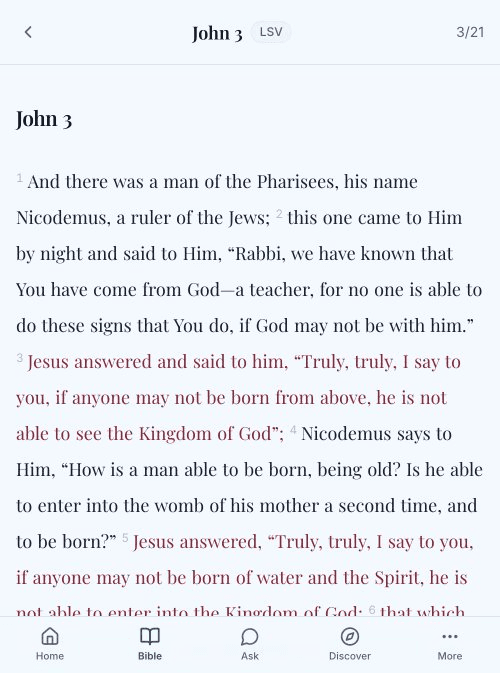
TheoScriptura provides a clean, distraction-free reading experience optimized for Scripture study.
Reading Interface
When you open a chapter, you'll see:
- Chapter heading — Book name and chapter number
- Verse text — Scripture with verse numbers
- Red letters — Jesus's words highlighted (when enabled)
Verse Numbers
Verse numbers appear in superscript before each verse. The display style can be customized in Settings:
- Subtle — Small, unobtrusive numbers
- Standard — Normal-sized numbers
- Hidden — No verse numbers shown
Reading Modes
Choose how verses are displayed:
Paragraph Mode (Default)
Verses flow naturally as continuous text, similar to a book. Best for immersive reading.
Verse-by-Verse Mode
Each verse starts on a new line. Best for study and memorization.
Change the mode in Settings → Reader → Reading Mode.
Red Letters
When enabled, the words of Jesus appear in red text. This traditional feature helps identify Christ's direct speech in the Gospels.
Toggle in Settings → Reader → Red Letters.
Customize Your Reading
Font Style
Choose from:
- Serif — Classic, traditional look
- Sans-serif — Clean, modern appearance
Font Size
Adjust text size:
- Small
- Medium (default)
- Large
- Extra Large
Line Spacing
Control space between lines:
- Compact
- Relaxed (default)
- Spacious
Theme
- System — Matches your device
- Light — White background
- Dark — Dark background for night reading
Live Preview
Settings includes a live preview showing John 3:16 with your current settings applied. See changes in real-time before leaving Settings.
Reading Actions
While reading, you can:
- Tap a verse — Select for bookmarking or sharing (coming soon)
- Long press — Copy verse text
- Scroll — Move through the chapter