Loading content…
Enroll in a Plan
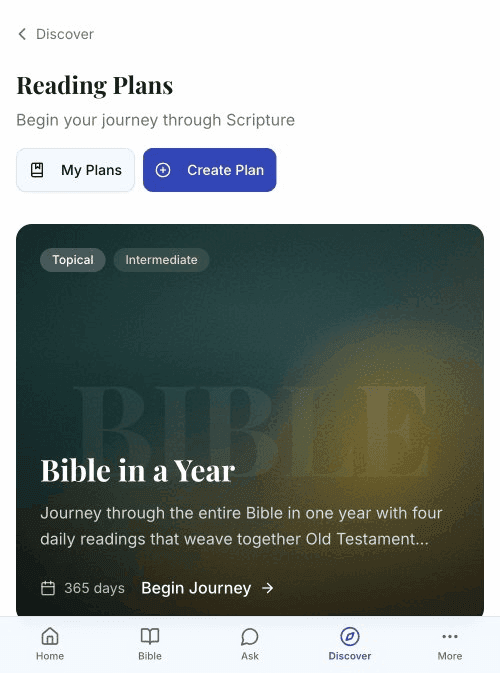
Start a reading plan to guide your daily Scripture study.
View Plan Details
- Browse the plan catalog
- Tap a plan card to open details
- Review the full information:
- Complete description
- Category and difficulty
- Duration and reader count
- Day-by-day outline
Plan Detail Page
The detail page shows:
Header Section
- Cover image or gradient
- Back button (return to catalog)
- Share button (share with friends)
Plan Information
- Title — Full plan name
- Creator — Author (for user-created plans)
- Description — Complete overview
- Badges — Category, difficulty, duration
- Stats — Reader count and completions
Day List
- Preview of all days
- Day titles and themes
- Expandable day content
Enroll in a Plan
For Signed-In Users
- On the plan detail page, tap Start This Plan or Begin Journey
- The plan is added to "My Plans"
- You're taken to Day 1
For Guests
- Tap Sign in to start this plan
- Create an account or sign in
- Return to the plan and start
Active Plan Limits
Your subscription determines how many plans you can have active:
| Tier | Active Plans | |------|--------------| | Free | 1 | | Plus | 5 | | Scholar | Unlimited |
If you're at your limit, you'll need to:
- Complete or leave a current plan
- Upgrade your subscription
Bonus Plans
Some plans are marked as "Bonus Plans" and don't count toward your active plan limit. This means free users can participate in these plans alongside their regular plan allocation.
Current Bonus Plans:
- Bible in a Year (365-day reading plan)
Bonus plans are identified by a purple "Bonus" badge on:
- Plan catalog cards
- Plan detail pages
- My Plans dashboard
This allows everyone to participate in year-long reading plans without affecting their ability to do shorter topical studies.
Leave a Plan
To stop a plan before completion:
- Go to My Plans
- Find the plan
- Tap Leave Plan
- Confirm your choice
Your progress is saved if you rejoin later.
Plan Language
Some plans support multiple languages:
- On the plan detail page, find Content Language
- Select your preferred language (e.g., English, Hindi, Spanish)
- Readings will display in that language